
Why More RAM Doesn’t Always Mean Faster
Beyond a certain point, additional RAM doesn’t directly improve performance unless the application can use it. The biggest gains come from crossing thresholds where systems stop thrashing and start operating normally. Going from 1 GB to 2 GB is often dramatic. Going from 2 GB to 4 GB is about resilience and growth, not raw speed.
This is why small upgrades can feel transformational, while larger ones feel incremental.
Concrete Examples For WordPress, SaaS Apps, And APIs
RAM upgrades are often sold as simple performance improvements. Double the memory, double the capability. In practice, the difference between 1 GB, 2 GB, and 4 GB of RAM is less about raw speed and more about what breaks, what slows down, and what suddenly becomes reliable.
For non-technical decision-makers, RAM is best understood as working space. Too little, and tasks queue, stall, or fail. Enough, and systems behave predictably under normal load.
What 1 GB RAM Really Means
With 1 GB of RAM, systems operate close to the edge. A basic WordPress site with a lightweight theme can run, but there is little room for error. A traffic spike, a heavy plugin, or a background task like backups can push the server into swapping or process kills. Pages load inconsistently, and admin actions feel slow.
For small SaaS apps or APIs, 1 GB forces strict limits. Only a few concurrent requests can be handled comfortably. Memory-hungry libraries, background jobs, or caching are constrained or disabled entirely. This setup can work for prototypes or very low-traffic services, but reliability suffers as soon as real usage begins.
What Improves At 2 GB RAM
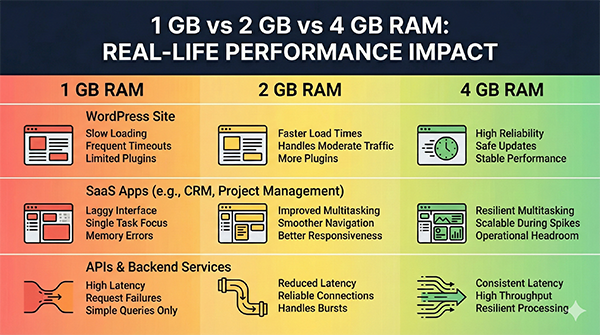
At 2 GB, systems become noticeably more stable. WordPress can handle common plugins, moderate traffic, and background tasks without constantly running out of memory. Caching layers and PHP workers have room to breathe, which reduces random slowdowns.
For SaaS applications and APIs, 2 GB often marks the point where normal concurrency feels safe. You can run application code, basic monitoring, and small caches at the same time. Incidents caused purely by memory pressure become less frequent, and performance becomes more predictable.
This is often the minimum where teams stop fighting the system and start focusing on the product.
What 4 GB RAM Changes Operationally
At 4 GB, the conversation shifts from survival to headroom. WordPress installations can handle higher traffic, more complex plugins, and safer update processes. Background jobs run without interfering with user requests. Caching becomes effective rather than fragile.
For SaaS apps and APIs, 4 GB allows multiple services, larger in-memory caches, and smoother scaling during traffic spikes. It doesn’t remove the need for good architecture, but it reduces the chance that small mistakes immediately turn into outages.
From a business perspective, this is where operational stress drops. Teams spend less time reacting to slowdowns and more time improving features.
How To Think About RAM Decisions
If your system is restarting processes, timing out during peaks, or behaving inconsistently under modest load, you’re likely under-provisioned. If performance is stable but growth feels risky, additional RAM buys breathing room.
RAM should be sized for the worst normal day, not the best one. Headroom is what turns unpredictable systems into boring ones.
1 GB is for experiments and very small workloads. 2 GB is where basic reliability starts. 4 GB provides operational safety and room to grow. Choose RAM not based on theoretical limits, but on how much unpredictability your business can tolerate.